RELX 5th Gen Flashing Light Issues: Phantom Indicator Guide
RELX 5th Gen Flashing Light Issues: Phantom Indicator Guide
 The RELX Phantom, known as the 5th generation product, features a tidal light design that allows users to see the remaining battery level in real-time, alleviating some users' anxiety about battery life compared to the previous four generations with a single light indicator.
During the use of the Phantom, many users encounter issues with the flashing indicator lights. What do these lights mean? This has caused confusion for some users. Below, I will introduce the indicator light meanings for the RELX 5th generation Phantom, categorized into four states:
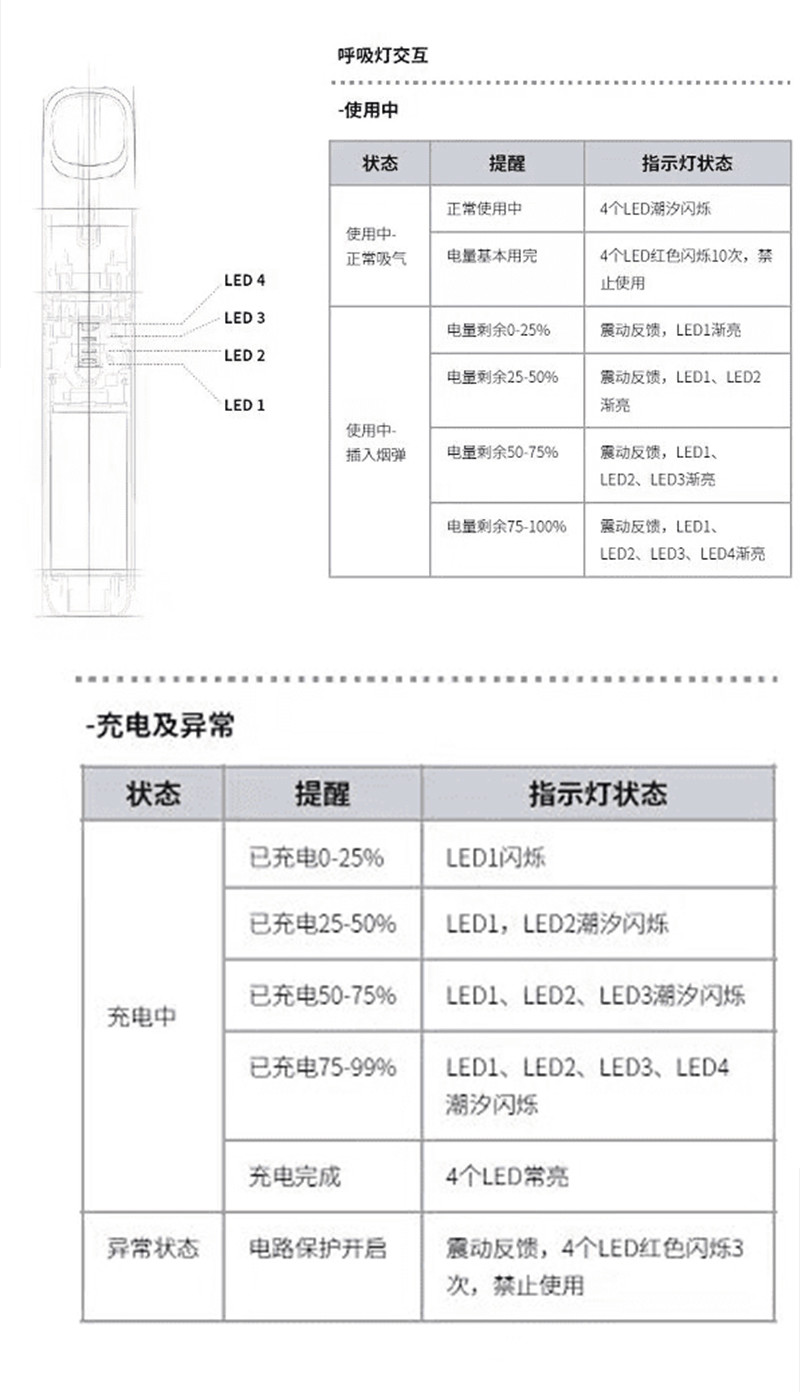
1. RELX 5th Gen Phantom Inhalation State
Normal use — 4 LED lights flash in a tidal pattern;
Battery nearly depleted — 4 LED lights flash 10 times, use is prohibited;
2. RELX 5th Gen Phantom Pod Insertion State
Battery level 0-25% — Vibration feedback, LED1 light gradually brightens;
Battery level 25-50% — Vibration feedback, LED1 light and LED2 light gradually brighten;
Battery level 50-75% — Vibration feedback, LED1 light, LED2 light, and LED3 light gradually brighten;
Battery level 75-auto — Vibration feedback, LED1 light, LED2 light, LED3 light, and LED4 light gradually brighten;
3. RELX 5th Gen Phantom Charging State
Charged 0-25% — LED1 light flashes;
Charged 25-50% — LED1 light and LED2 light flash in a tidal pattern;
Charged 50-75% — LED1 light, LED2 light, and LED3 light flash in a tidal pattern;
Charged 75-auto — LED1 light, LED2 light, LED3 light, and LED4 light flash in a tidal pattern;
Charging auto complete — All 4 LED lights remain on;
(Note: Charge fully before use, do not use while charging)
4. RELX 5th Gen Phantom Abnormal State
When the Phantom encounters improper operation or use, such as being squeezed or bumped, excessive inhalation, condensation accumulation (wipe the water droplets at the bottom of the pod and the inner wall of the device), moisture intrusion, abnormal charging voltage (e.g., using a fast charger), overcharging (generally charging for 45-60 minutes is sufficient), improper insertion/removal, or using counterfeit pods, the Phantom will automatically enter a circuit protection state to prevent further damage. At this time, the device vibrates, and all 4 LED lights display red and flash 3 times.
If you encounter the above abnormal state during charging or use, be sure to stop using it. You should check the above reasons and take appropriate action, and only resume normal use after the indicator lights return to normal.
If the red light remains after fully charging, wipe the water droplets at the bottom of the pod and the inner wall of the device.