IQOS 3 charging failure and red light issues: summary and solutions
It has been nearly half a year since the IQOS 3 series was launched. Officially, the chances of red light failures were said to be reduced, but many users still encounter usage misunderstandings and technical issues they do not know how to resolve after r
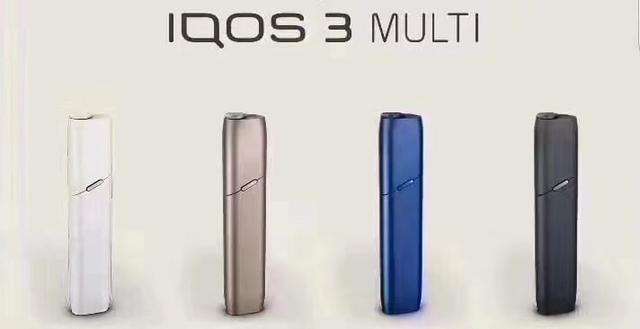
IQOS 3 series has been released for nearly half a year now. The official explanation has reduced the likelihood of red light failures, but many customers still encounter some usage misconceptions and unresolved issues. Today, I will explain these problems and their solutions.
1. No response during the first charge after receiving the product
This is the most common issue I encounter. There’s no need to panic; the device will take 5-10 minutes to respond during the first charge. Be patient, and after a few minutes, your charging case will light up. The first charging time is relatively long, about two hours, so please wait until all four battery indicator lights are solid or all LED lights are off.
Check if the charging connector is powered. The Japanese version of the charging adapter is flat like the national standard charger, while the Korean/European version has a round European standard head, which requires a higher standard for sockets. It is recommended to use a new power strip for stable charging.
Remember
Always use the original charger for charging.
After confirming power, perform a forced reset to restore the program by pressing the button on the 3.0/Multi device five times. At this point, the leftmost and rightmost small lights of the 3.0/Multi battery indicator will light up, while the two middle small lights will be off. Hold the button for about 10 seconds until all indicator lights go off, then wait for a restart. After restarting, the battery indicator light will flash a few times and gradually light up. Done.
2. Red light phenomenon during Multi use
There are several reasons for this. The first is that you may have used the Multi frequently, causing the heating element to overheat. It will return to normal once the temperature decreases. The second situation is a program error; simply hold the button for 10 seconds to restart the device. The third is that the heating element has not been cleaned for a long time, causing uneven heating or poor heat dissipation. Please clean your heating element thoroughly (the standard for cleanliness is to reveal its original color). The fourth is whether the ambient temperature is within the range of 0℃-50℃; too cold or too hot can cause red light failure. The fifth possibility is using a non-original charger, which may damage the battery. Replacing the battery will solve this. The sixth is issues caused by water ingress, and the seventh is a short circuit in the heating cleaning circuit. If none of these situations resolve the issue, please refer to the next method.
Perform a forced reset to restore the program by pressing the button on the 3.0/Multi device five times. At this point, the leftmost and rightmost small lights of the 3.0/Multi battery indicator will light up, while the two middle small lights will be off. Hold the button for about 10 seconds until all indicator lights go off, then wait for a restart. After restarting, the battery indicator light will flash a few times and gradually light up. Done.
3. 3.0 split device battery indicator turns yellow
In general, this does not affect normal use. The indicator light turns yellow when it is damp; try to avoid using it in humid environments. It may be visually uncomfortable, but those with obsessive-compulsive tendencies may find it intolerable and may need to disassemble it to resolve the issue.
4. 3.0 split device charging indicator turns yellow
If you accidentally turn on the yellow small round light, don’t worry; it’s not a fault. It indicates that Bluetooth is on and needs to be paired with the official app "IQOS Connect" to turn off Bluetooth. Currently, the official app is not available in Korea, and in Japan, an official account login is required. The conditions for registering an official account require a local Japanese phone number, national health certificate, or driver's license to prove that you are over 18 years old, making it unavailable for domestic use.
5. Multi front cap cannot trigger closure
The earliest batch of Multi front caps could return to their position normally, as the internal triggering device was long enough. Each time after removing the pod, the cap could return to its position. All IQOS plastic parts are manufactured by China's YQ Technology, and later batches have a triggering device that is not long enough, occasionally failing to trigger the closure. This is not a quality issue; you can apply a little neoprene glue or other methods to extend the triggering device to resolve it.
6. Light goes out instantly after starting heating
There are several possible reasons for this: 1. The heating element was cleaned with alcohol while operating at high temperatures, which can cause an invisible short circuit. 2. Using hard objects to clean the heating element residue can damage the circuit board, etc. Although you may see that the heating element is intact, the circuit may have internally broken, causing it to turn off after starting. The only solution is to repair or replace the heating element.
1. No response during the first charge after receiving the product
This is the most common issue I encounter. There’s no need to panic; the device will take 5-10 minutes to respond during the first charge. Be patient, and after a few minutes, your charging case will light up. The first charging time is relatively long, about two hours, so please wait until all four battery indicator lights are solid or all LED lights are off.
Check if the charging connector is powered. The Japanese version of the charging adapter is flat like the national standard charger, while the Korean/European version has a round European standard head, which requires a higher standard for sockets. It is recommended to use a new power strip for stable charging.
Remember
Always use the original charger for charging.
After confirming power, perform a forced reset to restore the program by pressing the button on the 3.0/Multi device five times. At this point, the leftmost and rightmost small lights of the 3.0/Multi battery indicator will light up, while the two middle small lights will be off. Hold the button for about 10 seconds until all indicator lights go off, then wait for a restart. After restarting, the battery indicator light will flash a few times and gradually light up. Done.
2. Red light phenomenon during Multi use
There are several reasons for this. The first is that you may have used the Multi frequently, causing the heating element to overheat. It will return to normal once the temperature decreases. The second situation is a program error; simply hold the button for 10 seconds to restart the device. The third is that the heating element has not been cleaned for a long time, causing uneven heating or poor heat dissipation. Please clean your heating element thoroughly (the standard for cleanliness is to reveal its original color). The fourth is whether the ambient temperature is within the range of 0℃-50℃; too cold or too hot can cause red light failure. The fifth possibility is using a non-original charger, which may damage the battery. Replacing the battery will solve this. The sixth is issues caused by water ingress, and the seventh is a short circuit in the heating cleaning circuit. If none of these situations resolve the issue, please refer to the next method.
Perform a forced reset to restore the program by pressing the button on the 3.0/Multi device five times. At this point, the leftmost and rightmost small lights of the 3.0/Multi battery indicator will light up, while the two middle small lights will be off. Hold the button for about 10 seconds until all indicator lights go off, then wait for a restart. After restarting, the battery indicator light will flash a few times and gradually light up. Done.
3. 3.0 split device battery indicator turns yellow
In general, this does not affect normal use. The indicator light turns yellow when it is damp; try to avoid using it in humid environments. It may be visually uncomfortable, but those with obsessive-compulsive tendencies may find it intolerable and may need to disassemble it to resolve the issue.
4. 3.0 split device charging indicator turns yellow
If you accidentally turn on the yellow small round light, don’t worry; it’s not a fault. It indicates that Bluetooth is on and needs to be paired with the official app "IQOS Connect" to turn off Bluetooth. Currently, the official app is not available in Korea, and in Japan, an official account login is required. The conditions for registering an official account require a local Japanese phone number, national health certificate, or driver's license to prove that you are over 18 years old, making it unavailable for domestic use.
5. Multi front cap cannot trigger closure
The earliest batch of Multi front caps could return to their position normally, as the internal triggering device was long enough. Each time after removing the pod, the cap could return to its position. All IQOS plastic parts are manufactured by China's YQ Technology, and later batches have a triggering device that is not long enough, occasionally failing to trigger the closure. This is not a quality issue; you can apply a little neoprene glue or other methods to extend the triggering device to resolve it.
6. Light goes out instantly after starting heating
There are several possible reasons for this: 1. The heating element was cleaned with alcohol while operating at high temperatures, which can cause an invisible short circuit. 2. Using hard objects to clean the heating element residue can damage the circuit board, etc. Although you may see that the heating element is intact, the circuit may have internally broken, causing it to turn off after starting. The only solution is to repair or replace the heating element.