Vapor Storm 200 Temperature Control Box Mod User Guide
Product Introduction: Vapor Storm 200 is a brand-new box mod designed and developed by Vapor Storm. It features a stylish, high-end appearance, smooth overall design, and excellent hand feel, making it stand out among similar products. Standard package in
Product Introduction:
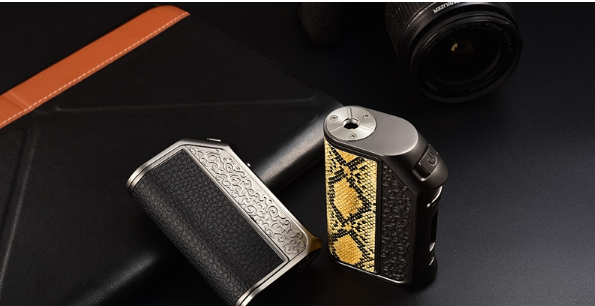
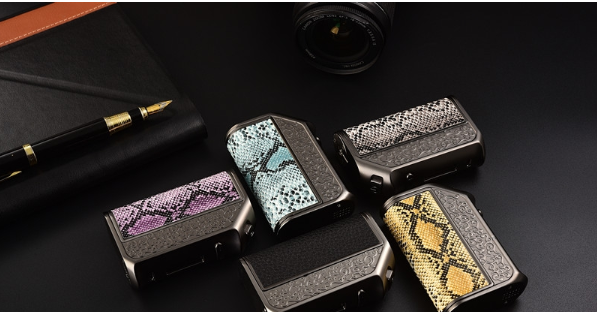
The Vapor Storm 200 is a brand new battery mod designed and developed by Vapor Storm, featuring a high-end and stylish appearance. The overall design is fluid, and it stands out in both feel and aesthetics among similar products!
Standard Configuration:
1× Vapor Storm 200 Mod
1× USB Charging Cable
1× Warranty Card
1× User Manual
Product Parameters:
Product Model: Vapor Storm 200
Working Voltage: 6.4V-8.4V
Load Range: 0.06-5Ω
Load Types: Regular coils, Ni200, Ti01, SS316
Output Power: 5.0-200W
Output Voltage: 0~8.0V
Output Current: 0~46A
Temperature Control Adjustment: 200F-600F (100-315 degrees Celsius)
Charging Method: USB: 5V/<1500mA
Display Mode: 0.91 inch OLED (128*32), white light
Weight: 185G
Operation Guide:
Power On/Off:
Connect the power, the OLED will automatically display the startup logo and directly enter the main interface, remembering the last mode displayed when powered off; press the fire button five times to display "SYSTEM OFF" to turn off the device.
Smart Sleep: If there is no operation, it will automatically enter sleep mode after 20 seconds; in sleep mode, any button can wake it up and enter the operation interface.
Coil Detection Function: Each time a new atomizer is replaced, it will automatically prompt + NEW LOAD / - OLD LOAD. For new atomizers, press the "+" button for detection; for old atomizers, press the "-" button, defaulting to the last atomizer's resistance, type, and working mode.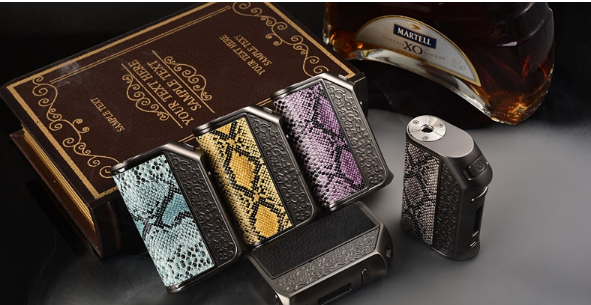
Working Mode Switching:
1. Press the "fire" button three times to enter the selection interface; (Power Mode VW, Power Curve Adjustment Mode CCW), Temperature Control Mode (SS316, Ni200, Ti modes)
2. Short press the "fire button" to switch modes, long press the "fire button" for 1 second to confirm the mode.
3. If CCW mode is selected, it will enter CCW curve adjustment:
(1) Short press the "fire button" once to move a cursor to select the current output temperature, and adjust the corresponding output power using the "+" and "-" buttons. Long press the "fire button" for 1 second to save the current settings and exit.
Temperature Control Mode: Displays the temperature control mode smoking main interface, allowing temperature adjustment from 200℉-600℉ (100℃-315℃) in a loop: 200℉->600℉->100℃->315℃->200℉; long press for quick adjustment; Fahrenheit steps are 10℉, Celsius steps are 5℃.
Button Ignition Speed Adjustment: On the main interface, hold the "fire button" and the "+" button to enter ignition speed adjustment, with a total of 5 levels. Each short press of the "+" or "-" or "fire button" adjusts one level, and long press the "fire button" for 1 second to save and exit.
Timeout Smoking Protection: If a puff exceeds 10 seconds, output will be forcibly shut off, and the screen will display "10S OVER TIME".
Output Short Circuit Protection: If there is a short circuit or the load is less than 0.05Ω, there will be no output during smoking, and the OLED will display the short circuit interface "SHORT ATOMIZER".
No Load Prompt: If the smoking function is activated without an atomizer connected, the OLED will display the open circuit interface "CHECK ATOMIZER".
Over Temperature Protection: If the PCBA board temperature exceeds 70 degrees Celsius, the OLED will prompt an over-temperature interface "HIGH TEMPERATURE" during smoking.
Automatic Power Reduction: If the battery voltage drops below 6V during smoking, the power output will automatically decrease, prompting LOW POWER.
Low Voltage Protection: When the battery voltage is below 3.3V, the battery symbol will flash, indicating low power. Pressing the smoking button will prompt "LOW BATTERY", and there will be no output. If the battery voltage drops below 2.9V, the system will not start, requiring battery replacement or charging.
About Memory: After manually shutting down, the last temperature setting, power setting, and working mode will be remembered when powered on again.
Charging Function: Uses a USB interface for direct charging, with a charging current not exceeding 1500mA. During battery charging, the screen remains on, and the battery symbol dynamically displays charging status.
Software Upgrade: Remove the atomizer, long press the smoking button, then connect to USB for online firmware upgrade, allowing online parameter settings (temperature coefficient, temperature curve) and customization of the menu and logo on the host computer.
Temperature Control Modes: NI200/TI/SS316
Specifications: 55X22X75MM
Battery Capacity: 3200MAH
Material: High-end zinc alloy + 304 stainless steel
The Vapor Storm 200 is a brand new battery mod designed and developed by Vapor Storm, featuring a high-end and stylish appearance. The overall design is fluid, and it stands out in both feel and aesthetics among similar products!
Standard Configuration:
1× Vapor Storm 200 Mod
1× USB Charging Cable
1× Warranty Card
1× User Manual
Product Parameters:
Product Model: Vapor Storm 200
Working Voltage: 6.4V-8.4V
Load Range: 0.06-5Ω
Load Types: Regular coils, Ni200, Ti01, SS316
Output Power: 5.0-200W
Output Voltage: 0~8.0V
Output Current: 0~46A
Temperature Control Adjustment: 200F-600F (100-315 degrees Celsius)
Charging Method: USB: 5V/<1500mA
Display Mode: 0.91 inch OLED (128*32), white light
Weight: 185G
Operation Guide:
Power On/Off:
Connect the power, the OLED will automatically display the startup logo and directly enter the main interface, remembering the last mode displayed when powered off; press the fire button five times to display "SYSTEM OFF" to turn off the device.
Smart Sleep: If there is no operation, it will automatically enter sleep mode after 20 seconds; in sleep mode, any button can wake it up and enter the operation interface.
Coil Detection Function: Each time a new atomizer is replaced, it will automatically prompt + NEW LOAD / - OLD LOAD. For new atomizers, press the "+" button for detection; for old atomizers, press the "-" button, defaulting to the last atomizer's resistance, type, and working mode.
Working Mode Switching:
1. Press the "fire" button three times to enter the selection interface; (Power Mode VW, Power Curve Adjustment Mode CCW), Temperature Control Mode (SS316, Ni200, Ti modes)
2. Short press the "fire button" to switch modes, long press the "fire button" for 1 second to confirm the mode.
3. If CCW mode is selected, it will enter CCW curve adjustment:
(1) Short press the "fire button" once to move a cursor to select the current output temperature, and adjust the corresponding output power using the "+" and "-" buttons. Long press the "fire button" for 1 second to save the current settings and exit.
Temperature Control Mode: Displays the temperature control mode smoking main interface, allowing temperature adjustment from 200℉-600℉ (100℃-315℃) in a loop: 200℉->600℉->100℃->315℃->200℉; long press for quick adjustment; Fahrenheit steps are 10℉, Celsius steps are 5℃.
Button Ignition Speed Adjustment: On the main interface, hold the "fire button" and the "+" button to enter ignition speed adjustment, with a total of 5 levels. Each short press of the "+" or "-" or "fire button" adjusts one level, and long press the "fire button" for 1 second to save and exit.
Timeout Smoking Protection: If a puff exceeds 10 seconds, output will be forcibly shut off, and the screen will display "10S OVER TIME".
Output Short Circuit Protection: If there is a short circuit or the load is less than 0.05Ω, there will be no output during smoking, and the OLED will display the short circuit interface "SHORT ATOMIZER".
No Load Prompt: If the smoking function is activated without an atomizer connected, the OLED will display the open circuit interface "CHECK ATOMIZER".
Over Temperature Protection: If the PCBA board temperature exceeds 70 degrees Celsius, the OLED will prompt an over-temperature interface "HIGH TEMPERATURE" during smoking.
Automatic Power Reduction: If the battery voltage drops below 6V during smoking, the power output will automatically decrease, prompting LOW POWER.
Low Voltage Protection: When the battery voltage is below 3.3V, the battery symbol will flash, indicating low power. Pressing the smoking button will prompt "LOW BATTERY", and there will be no output. If the battery voltage drops below 2.9V, the system will not start, requiring battery replacement or charging.
About Memory: After manually shutting down, the last temperature setting, power setting, and working mode will be remembered when powered on again.
Charging Function: Uses a USB interface for direct charging, with a charging current not exceeding 1500mA. During battery charging, the screen remains on, and the battery symbol dynamically displays charging status.
Software Upgrade: Remove the atomizer, long press the smoking button, then connect to USB for online firmware upgrade, allowing online parameter settings (temperature coefficient, temperature curve) and customization of the menu and logo on the host computer.
Temperature Control Modes: NI200/TI/SS316
Specifications: 55X22X75MM
Battery Capacity: 3200MAH
Material: High-end zinc alloy + 304 stainless steel